Industry playbooks
School Social Media Post Ideas: 4 Examples
By Memes.ai
Updated October 16, 2026 · 4 min read

A school social post should make the next action clear to families and the community. Use verified dates, one official information link and plain instructions. Share learning through approved work or empty-room details when a student photograph is unnecessary. Below are four finished visual concepts and example captions, with image briefs you can adapt to your own brand. The artwork uses fictional businesses and AI-generated scenes. For a post about your actual people, place or service, supply authorized photographs and confirmed details.
What you’ll take away
- Start with “A place to learn. a community to belong.” for one visual idea. Use “Look what a question can start” for a different view of the same business. Choose the example that supports the message you want a reader to understand.
- Follow the school's image and safeguarding permissions. Hide student records and personal details. Verify every date and direct families to the official information source.
- Use the finished captions as creative examples. The adaptation notes include practical copy templates for your own confirmed details. Match your image, message and destination to the same reader task.
1. A place to learn. A community to belong.
Finished AI-generated creative for the fictional brand CEDAR GROVE SCHOOL. This is an illustrative concept, not a real customer, venue or campaign result. Headline: “A PLACE TO LEARN. A COMMUNITY TO BELONG.”.
Finished example caption — The open door, the familiar path and the people who welcome you. A school is a place to learn and a community to belong to.
Why use this post — A welcoming entrance connects the school with a sense of place and community.
Make it your own — Confirm the date and audience with the school team. Keep private student information out of the card. If you need a practical service-information version, adapt this template with confirmed details: A reminder for [school community]: [verified event] is on [date]. Find the current timing, location and required steps at [official page].
Image brief to adapt
Create a finished square social image for my school business. Scene: A sunlit school entrance with a welcoming open door, adult school staff member standing nearby and autumn leaves along the path, no school notices with small text. Visual style: Thoughtful contemporary school communications photography; navy, cream, warm wood and muted green; welcoming spaces, adult staff only, no children or personal records. Use this headline exactly: “A PLACE TO LEARN. A COMMUNITY TO BELONG.”. Replace the fictional example brand CEDAR GROVE SCHOOL with my supplied business name. Make the scene the main visual, with a short legible headline and a small brand wordmark. Do not render placeholder fields or instructions. Do not invent a date, price, address, credential, offer or result. Use my authorized photographs when the post describes my actual people, premises, products or completed work. Review every detail before publishing.
2. Look what a question can start

Finished AI-generated creative for the fictional brand CEDAR GROVE SCHOOL. This is an illustrative concept, not a real customer, venue or campaign result. Headline: “LOOK WHAT A QUESTION CAN START”.
Finished example caption — A shape, a seedling, a closer look. One small question can open the door to another way of seeing.
Why use this post — A close learning activity gives the audience one clear example of curiosity in practice.
Make it your own — Use approved work and remove identifying details. Do not invent student quotes. If you need a practical service-information version, adapt this template with confirmed details: This week in [approved class or subject], the focus is [actual topic]. Here is an anonymized example of the activity and the question it explores.
Image brief to adapt
Create a finished square social image for my school business. Scene: Close editorial photograph of an anonymous classroom science-and-art activity: wooden blocks, simple paper geometric shapes, magnifying glass and seedlings on a clean desk, no names or student work labels. Visual style: Thoughtful contemporary school communications photography; navy, cream, warm wood and muted green; welcoming spaces, adult staff only, no children or personal records. Use this headline exactly: “LOOK WHAT A QUESTION CAN START”. Replace the fictional example brand CEDAR GROVE SCHOOL with my supplied business name. Make the scene the main visual, with a short legible headline and a small brand wordmark. Do not render placeholder fields or instructions. Do not invent a date, price, address, credential, offer or result. Use my authorized photographs when the post describes my actual people, premises, products or completed work. Review every detail before publishing.
3. Know who to ask

Finished AI-generated creative for the fictional brand CEDAR GROVE SCHOOL. This is an illustrative concept, not a real customer, venue or campaign result. Headline: “KNOW WHO TO ASK”.
Finished example caption — A familiar face can make a question easier to ask. Get to know the people behind the places around school.
Why use this post — A staff portrait helps families identify the people they can ask.
Make it your own — Use the school's normal contact process and verify the role description. If you need a practical service-information version, adapt this template with confirmed details: Meet [approved name], our [verified role]. Families can ask about [actual topic] through [school-approved contact route].
Image brief to adapt
Create a finished square social image for my school business. Scene: Friendly adult school librarian standing in a light-filled school library with simple shelves and a reading table, natural portrait, no students or readable book titles. Visual style: Thoughtful contemporary school communications photography; navy, cream, warm wood and muted green; welcoming spaces, adult staff only, no children or personal records. Use this headline exactly: “KNOW WHO TO ASK”. Replace the fictional example brand CEDAR GROVE SCHOOL with my supplied business name. Make the scene the main visual, with a short legible headline and a small brand wordmark. Do not render placeholder fields or instructions. Do not invent a date, price, address, credential, offer or result. Use my authorized photographs when the post describes my actual people, premises, products or completed work. Review every detail before publishing.
4. Come together. Be part of it.
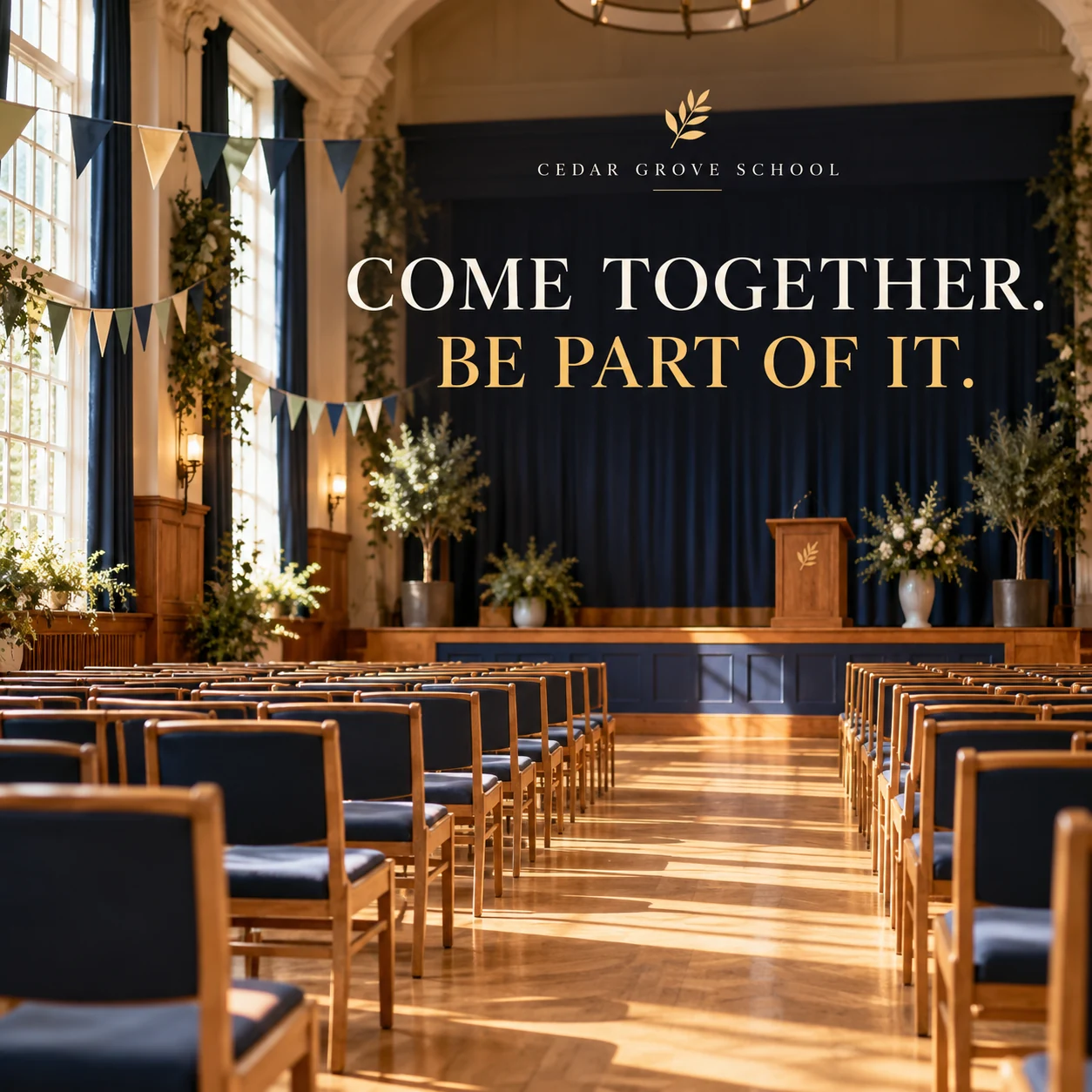
Finished AI-generated creative for the fictional brand CEDAR GROVE SCHOOL. This is an illustrative concept, not a real customer, venue or campaign result. Headline: “COME TOGETHER. BE PART OF IT.”.
Finished example caption — A room ready to fill with conversation. School events bring the community together, one shared occasion at a time.
Why use this post — A gathering space gives a school-community message a clear visual setting.
Make it your own — Avoid public access codes or security details. Use only information the school has approved for public sharing. If you need a practical service-information version, adapt this template with confirmed details: Coming to [confirmed school event]? Please check [actual arrival information] and [required preparation] on [official event page] before attending.
Image brief to adapt
Create a finished square social image for my school business. Scene: An empty school hall prepared for a community gathering, neat chairs, a modest stage and warm daylight, tasteful paper decorations, no attendance lists, dates or security details. Visual style: Thoughtful contemporary school communications photography; navy, cream, warm wood and muted green; welcoming spaces, adult staff only, no children or personal records. Use this headline exactly: “COME TOGETHER. BE PART OF IT.”. Replace the fictional example brand CEDAR GROVE SCHOOL with my supplied business name. Make the scene the main visual, with a short legible headline and a small brand wordmark. Do not render placeholder fields or instructions. Do not invent a date, price, address, credential, offer or result. Use my authorized photographs when the post describes my actual people, premises, products or completed work. Review every detail before publishing.
Put it into practice
Build your first school content batch
Choose one confirmed event or family question. Ask the relevant school team to approve the details. Publish one practical card, then update the official page if information changes. Prepare each post as a small brief: audience, one useful detail, approved caption, matching visual and a single current destination. Follow the school's image and safeguarding permissions. Hide student records and personal details. Verify every date and direct families to the official information source. Before publishing, read the caption beside the image, confirm that all brackets are replaced and check the destination on a phone. After a week, review the questions and enquiries each post generated. Keep the useful information current and revise confusing details before making more variants.
Common questions
How can a school show learning without student photos?
Use approved anonymized work, equipment, a classroom setup or a teacher explanation. Check that names, grades and other identifying information are not visible.
Where should changing event details live?
Use the school's official event or information page as the current source. The post can summarize confirmed details and point there for updates.
Can I download and adapt these finished images?
Yes. Each example includes an original finished AI-generated image and a copyable image brief. Save the WebP as a visual reference, or use the brief to create a version for your own brand in Studio. The pictured businesses and scenes are fictional. Use authorized real photos for claims about your actual people, venue, products or completed work. The downloaded image is flattened; it does not contain editable text layers.
Turn the brief into your own creative
Choose a finished image and caption that fit your business task, then copy its brief into Studio to develop your own version. Use your own brand, current information and authorized real-world assets where needed.
Your starter brief
Replace the brackets with your own details.
Create a finished square social image for my school business. Scene: A sunlit school entrance with a welcoming open door, adult school staff member standing nearby and autumn leaves along the path, no school notices with small text. Visual style: Thoughtful contemporary school communications photography; navy, cream, warm wood and muted green; welcoming spaces, adult staff only, no children or personal records. Use this headline exactly: “A PLACE TO LEARN. A COMMUNITY TO BELONG.”. Replace the fictional example brand CEDAR GROVE SCHOOL with my supplied business name. Make the scene the main visual, with a short legible headline and a small brand wordmark. Do not render placeholder fields or instructions. Do not invent a date, price, address, credential, offer or result. Use my authorized photographs when the post describes my actual people, premises, products or completed work. Review every detail before publishing.
Copy your adapted brief, open Studio, and paste it into your creative workflow. Review the result before using it.
Create your version in Studio