Meme marketing
How to Make a Meme: From Idea to Finished Image
By Memes.ai
Updated September 6, 2026 · 5 min read
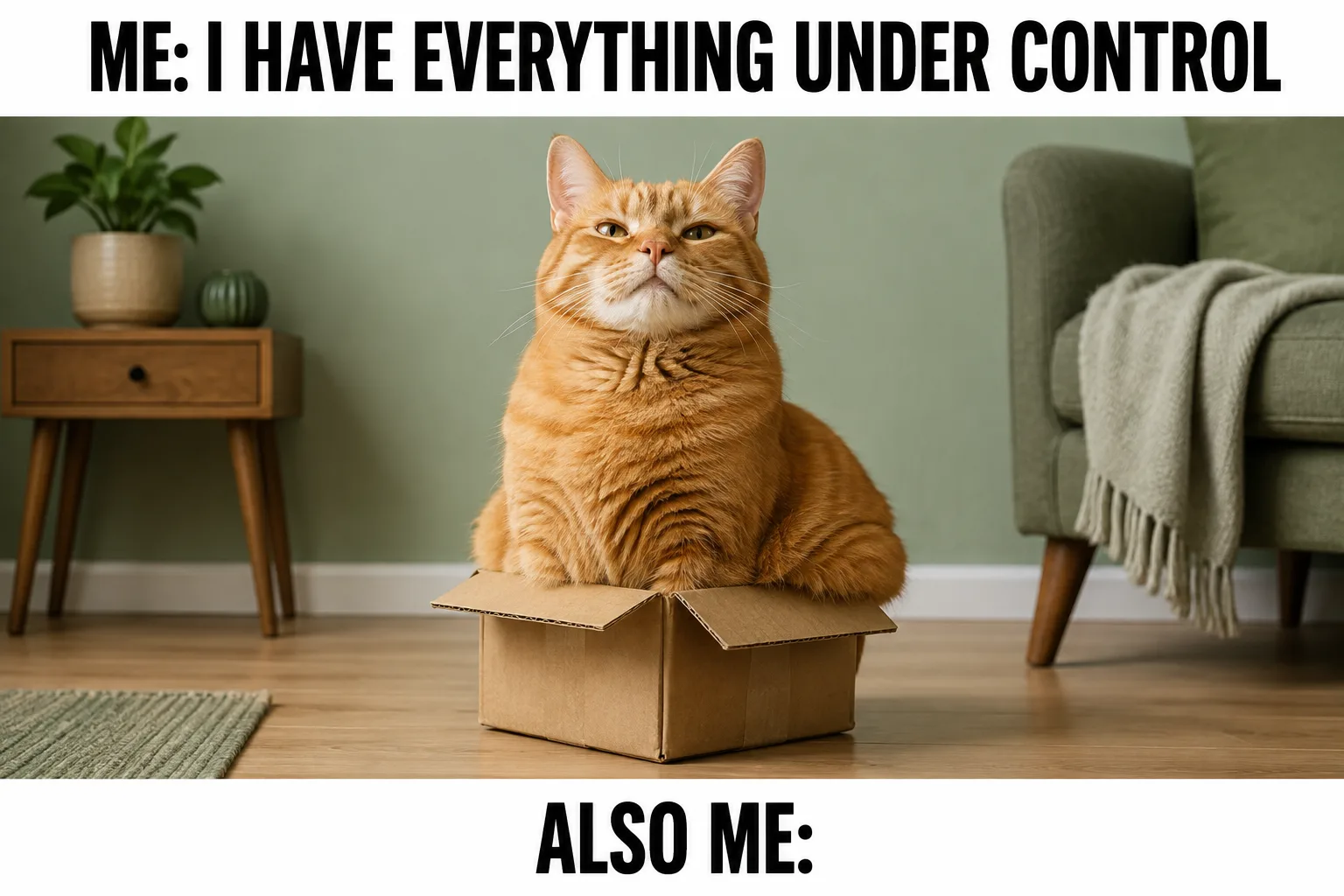
To make a meme, start with a situation people recognize, choose an image that expresses the feeling, and write a short caption that connects the two. You do not need a complicated design. The cat in the tiny box on this page works because its confidence contradicts the situation. The caption makes that contrast about a familiar human experience. Here is a repeatable process for making your own version.
What you’ll take away
- Give the image and caption separate jobs.
- Keep only the words needed for the joke.
- Check the exported image at phone size.
1. Write the situation before you pick the picture
The idea — Describe one recognizable event in plain language: agreeing to one more project when your week is already full, preparing a tiny suitcase for a long trip, or trying to act relaxed during a busy shift. Choose one, not a mixture.
Why it helps — Starting with a random famous template can push you into a joke that does not match your audience. A specific situation gives you a reason for every visual choice that follows.
Make it your own — Write: I say [confident statement], but the situation is [visible contradiction]. For the cat example, the statement is control and the contradiction is the absurdly small box.
2. Choose a visual with an instantly readable feeling
The idea — Look for one strong expression or object relationship: confidence, disbelief, tiny versus enormous, order versus chaos. Use an original photo, a generated fictional scene, or an asset you have permission to adapt.
Why it helps — If viewers need to study six characters and a complicated background, they may miss the joke. A simple visual lets the caption supply context rather than explaining the entire scene.
Make it your own — Try the image without text. Ask someone to name the feeling in a few words. If they cannot, simplify the scene or choose a clearer expression.
3. Draft several short captions
The idea — Write three versions of the setup and payoff. One can name the situation literally, another can use an internal thought, and a third can exaggerate the gap between intention and reality. Keep the premise constant while testing the wording.
Why it helps — The first draft often contains explanation that the picture already supplies. Comparing versions reveals which words create the joke and which merely describe what the viewer can see.
Make it your own — For the box image, compare Me: I have everything under control / Also me with a business-specific version about accepting another deadline. Keep whichever makes sense without a paragraph of context.
4. Build a clean hierarchy
The idea — Place the setup where the reader encounters it first and keep the payoff near the visual reveal. Use high contrast between text and background. Leave breathing room around faces, products, and important gestures.
Why it helps — A meme is read quickly. Decorative type, crowded borders, and long captions compete with the expression. A plain type treatment can be the most effective design choice.
Make it your own — View the draft at the size it will appear in a feed. If you must zoom to read it, cut words before shrinking the type. Keep any business logo secondary to the idea.
5. Check context, permissions, and accuracy
The idea — Ask whether the image or wording could imply something you did not intend. A joke about a shared inconvenience differs from mocking an identifiable customer or using a real person's image as an endorsement.
Why it helps — The same meme can mean different things in different communities. Original visuals reduce some ambiguity, but the caption can still make an unsupported product claim or reveal a private situation.
Make it your own — Remove names, personal details, or customer screenshots unless you have the necessary permission. For business use, replace factual-sounding exaggerations with a clearly comic setup.
6. Export, preview, and adapt
The idea — Export a sharp image suited to its placement, then view the actual file on a phone. Check line breaks, crop, and whether the punchline remains visible when the image is displayed in a card or preview.
Why it helps — A design can look balanced on a large canvas and cramped in a feed. Exporting is part of the creative process, not a final administrative step.
Make it your own — Keep an editable version so you can adjust the caption for another audience. Change the joke when the context changes instead of simply reposting an image with a new logo.
Put it into practice
A ten-minute caption exercise
Pick one ordinary image from your business: a busy counter, an overpacked bag, or a neatly finished task. Write what the person expected and what actually happened. Reduce each line to its essential words. Then make a second version that names a specific customer moment. Compare the two at thumbnail size. The stronger version should be understandable quickly, but it should also feel like something your intended audience would actually say.
Common questions
Can I make a meme without using a famous template?
Yes. A familiar structure such as expectation versus reality can work with an original image. The recognizable situation matters more than reproducing a particular photograph.
How much text should a meme have?
There is no universal limit. Use the shortest wording that makes the situation and payoff clear at the size people will actually view it.
What if people do not understand my meme?
Ask what they think the image means before explaining your intention. Their answer will tell you whether the problem is the image, missing context, or the caption.
Turn the brief into your own creative
Turn the worked process into an original concept using your own business context, then edit the text and image until the joke reads clearly.
Your starter brief
Replace the brackets with your own details.
Make one original meme image about [recognizable situation]. Visual: [simple expression or contrast]. Exact setup text: [setup]. Exact payoff text: [payoff]. Use clear high-contrast type, a simple background, and natural anatomy. Keep the main subject and text within safe margins. No real-person endorsement, third-party logo, or extra text.